Language Features
This section discusses some of the fundamental features of the Python language. Before we continue with actual programming, you must be aware of the different terminology that is used. Therefore, this overview is very useful to review before starting to work with operators and functions.
1. Variables and datatypes
As the name implies, the values of variables can vary. They store a piece of information and allow you to refer to this by its identifier. The identifiers are nothing more than a name that you define to identify the piece of information that is stored by the respective variable. Although you are quite flexible in choosing these names, there are some rules that you should stick to so Python can interpret your code properly.
Rules for naming identifiers:
- The first character of the variable name must always be a letter of the alphabet or an underscore (
_). - Python is case-sensitive. So keep that in mind when you are using lower (a) and upper (A) case letters.
- The remainder of the name can consist of letters, underscores (
_) and digits (0-9).
Other than these rules, variables ideally have well-defined, good, and meaningful names, so that you can understand them as a developer.
The information that is stored to those variables that you define can be of different data types.
A number of important datatypes in Python include:
int- integer: integer value (no floating point)float- float: floating point numberstr- string: sequence of charactersbool- boolean: binary value (TrueorFalse)
These data-types are discussed in more detail below.
1.1 Numbers (Integers & Floats)
Python makes a distinction between two types of numbers.
- Integers are whole numbers such as
1,23and2350525. - Floats (floating point numbers) are so-called “real” numbers. They are formulated with a decimal point and can capture fractions for integers. Examples include
1.25and2e3(2 times 10 to the power of 3).
# Integers
myInt = 1
anotherInt = -2018

# Floats
myFloat = 3.1415
anotherFloat = 2e3
1.2 Text (Strings)
A string is a sequence of characters. That is, they capture words, sentences, etc. However, they can also contain numbers. Keep in mind that if you define a number as a string, Python will interpret is as a piece of text (not a numerical value)!
Strings are specified using single, double and triple quotes.
- Single and double quotes are interpreted exactly the same in Python. You can use them to specify one-line pieces of text. Anything that is located between these quotes is treated as part of the string, including spaces, tabs, numbers, etc.
# Strings
myStr = "This is a string..."
anotherStr = 'This is also a string!'

# This is also a string. It is interpreted as a piece of text, not as a number!
# Hence, we cannot perform computational operations with this variable.
numberStr = '4'
- Triple quotes can be used to specify multi-line strings
# Multi-line Strings
'''This is a multi-line string. This is the first line.
This is the second line.
'''
Sometimes you might want to construct a text that contains values of other variables. For example, you might want to print a line of text that describes the output of your script. To do so, you can use the format() function. As you can see below, this allows us to insert the value of other variables in our piece of text. In this case, we have a sentence in which we insert a name and age. In later sections, you will learn in more detail how functions such as format() can be applied.
age = 25
name = Marjolein

Str = "My name is {0} and I am {1} years old.".format(name,age)
If you print this string to your console (using print(Str)), you will get the following output.
- My name is Marjolein and I am 25 years old.
1.3 Boolean
Booleans are special in the sense that they only take two values True and False. These are basically evaluations of some related statements. For example, if we provide 10<20 as a statement, the boolean evaluation would be True (indeed, 10 is smaller than 20). We will use this datatype later when we write conditional statements.
# boolean
myBool = True
anotherBool = 10 < 20
1.4 Find out the datatype of a variable
To find out the datatype of a variable, use the type() function. When you put the variable name between the parentheses, this function will return the data-type of the variable.
buildingName = "Vertigo"
type(buildingName)
Exercise 1: Data Types and Printing
- Try running
print(myStr)from the console to print the value of themyStrvariable to the console window. - Also, run
type(numberStr)to confirm that the value4is indeed a string and not an integer or float. - Find out the value of the variable
anotherBoolby printing it to the console usingprint(). What does this value tell you? - Create a variable called
universitywith the valueTU/eand one calledmyNamewith your name as its value. Finally, add another variable calledsentenceand use theformat()function to construct the following sentence: “My name isand I study at .”. Now print this sentence to the console window using print().
Are you having trouble using Spyder? Please refer back to section 3 of this tutorial.
# Integers
myInt = 1
anotherInt = -2018

# Floats
myFloat = 3.1415
anotherFloat = 2e3

# Strings
myStr = "This is a string..."
anotherStr = 'This is also a string!'

# This is also a string. It is interpreted as a piece of text, not as a number!
# Hence, we cannot perform computational operations with this variable.
numberStr = '4'

# Multi-line Strings
'''This is a multi-line string. This is the first line.
This is the second line.
'''

# boolean
myBool = True
anotherBool = 10 < 20

2. Special Data Structures
In addition to the datatypes discussed above, Python uses several special data structures that can hold multiple pieces of information. That is, they store a collection of data.
There are four built-in data structures in Python:
list- List: A sequence of items. Ordered & editable.tuple- Tuble: A sequence of items. Ordered & not editable.dict- Dictionary: A collection of key-value pairs.set- Set: A collection of items. Not ordered.
2.1 Lists
A list refers to a sequence of multiple items, which can be of different data-types. Important to remember is that the order of these items is fixed and the content of the list is editable. You define a list using square brackets ([]) and separate items using commas ([item1, item2, etc])
# Lists
myList = [2, 4, 42, 3.1415, 5000]
anotherList = ["Alpha", "Bravo", "Charlie"]

item1 = 1
item2 = 2

itemsList = [item1, item2]
2.2 Tuples
Tuples are very similar to lists. However, they allow for far fewer operations to be performed on them. They are not editable. Something which may seem impractical at first, but this can sometimes actually be very useful. You can use them for sequences that should at all times remain intact. You define a tuple using round brackets (()).
# Tuples
myTuple = (2, 4, 42, 3.1415, 5000)
anotherTuple = ("Alpha", "Bravo", "Charlie")
2.3 Sets
Sets differ from lists or tuples, because they are not ordered. That is, they do not contain a sequence of items, but simply an unordered collection of them. A set is defined using set([item1, item2, etc]). As you might notice, this is a function!
# Set
mySet = set([item1, item2, item3])
2.4 Dictionaries
Dictionaries in Python can be compared to physical dictionaries. If you want to know the meaning of a particular word, you start searching for the word (key) and at some point you will be able to find the corresponding meaning (value). The values in a dictionary variable are “bookmarked” using keys. Therefore we talk about key-value pairs. The combination of a word in the physical dictionary and its meaning would be a key-value pair. The values in a dictionary (as opposed to the keys!) can change over time.
You define a dictionary d with two items as d = {key1 : value1, key2 : value2 }. The key-value pairs are separated by commas, much like the items in a list. The key and values themselves are separated by a colon. You could now use key1 to look up value1.
Take as an example this dictionary that stores the ages of a group of people.
# Dictionary
myDic = {Marjolein : 25, Anne : 36, Caroline: 50}
How to work with these special data structures is discussed in a later section. That is, how can we retrieve or edit the data from these structures?
Exercise 2: Special Data Structures
- Someone is keeping a record of the names of all students that took a Python course. New people get added whenever they complete the course, which can be at different moments in time. Which of the above datatypes are suitable to store this data? Why are the others not suitable?
- Create a variable that stores a hypothetical list of students that took the python course.
- You would like to store a series of temperature measurements. The measurements are taken every minute. What data-type would you chose? Are there other options? In what situation would you have a specific preference? What are your considerations?
- Create a variable that stores a series of ten time measurements.
- Reflect on the variable you just created. Can Python tell which measurement was taken before another? (Is the order specified?)
- Are you able to tell at what time each measurement was taken, without knowing when you started measuring? If not, can you respecify the variable so that this is possible?
3. Literal Constants
In addition to variables, we can also use so-called “Literal Constants”. Examples include numbers or pieces of text (strings). It is called a literal because it is literal - you use its value literally. That is, 4 is not a variable storing some value. It is the actual value four itself. Likewise, "This is a string." is a string, a piece of text, and not a variable that stores it. They are constant in the sense that the value does not change. For example, 4 will always have a value of four. It will never change its value to five, or a string for that matter.
4. Comments
Comments are used to document your code inline. This can be very helpful for others (or yourself) to understand your script and keep an overview. As you might have noticed, we already used comments in our previous example codes.
”””comments multiple lines until ”””#comments out a single line
Exercise 3: Comments
5. Operators
Operators allow to perform operations on variables of particular data types. Although this might sound a bit abstract, hopefully the examples below will clear things up for you.
Several operators are available. There are plenty of cheat sheets online that provide an overview of commonly used ones. An example of such a sheet is shown below.
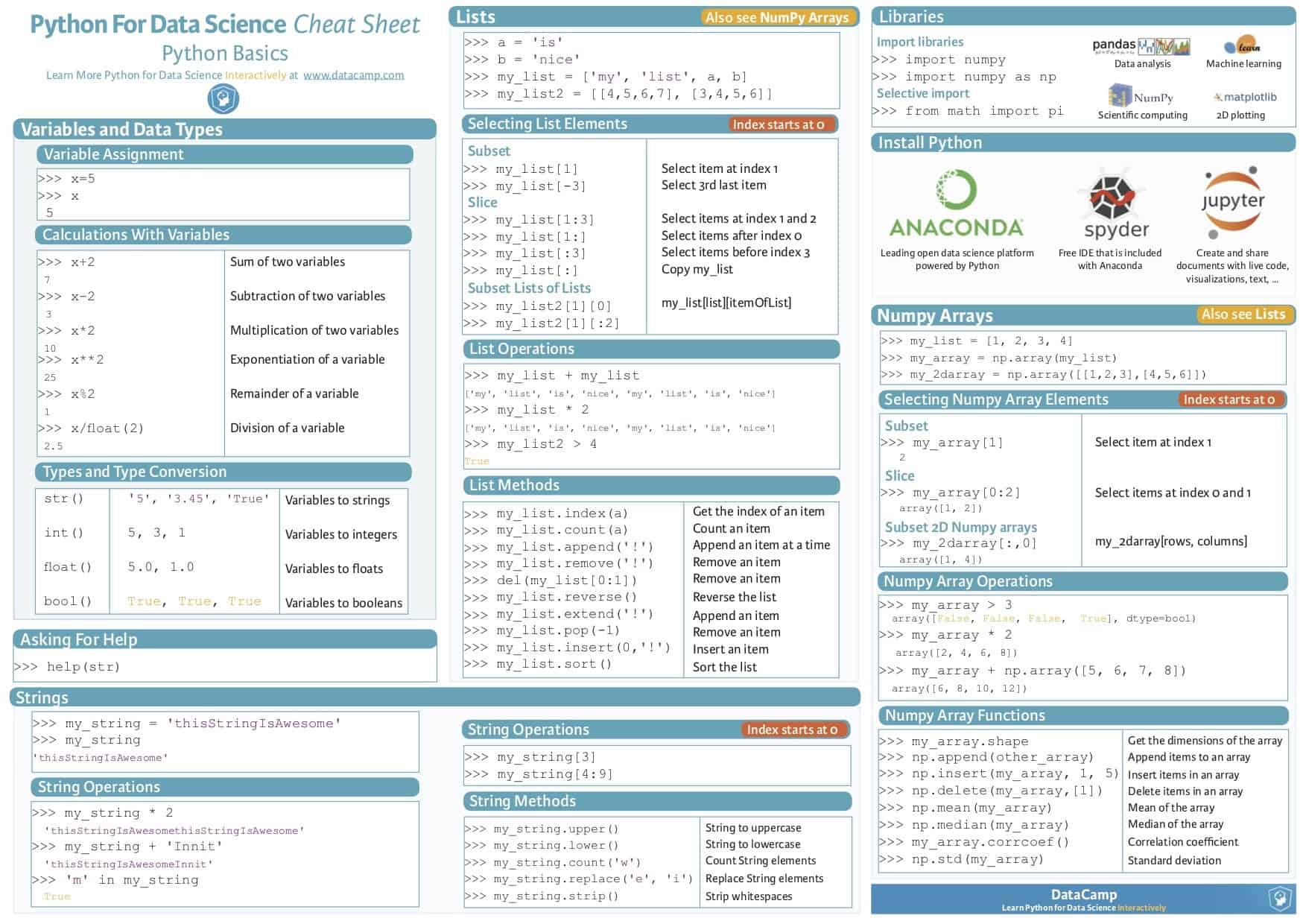
5.1 Number and boolean operators
Operators that can be used on numbers and boolean variables are likely familiar to you. They are often used in math.
X and y are examples of variables on which the operators are performed.
Arithmetic operators:
- x plus y:
x + y - x less y:
x - y - product of x and y:
x * y - x over y:
x / y - x to the power of y:
x ** y
Assignment operators:
- x equals y:
x = y(assigning the value of y to x) - x equals x + y:
x += y(adding y to the current value of x)
Comparison operators:
- Is x equal to y?:
x == y - Is x equal to y? (When x & y are boolean)
x is y - Is x not equal to y? (When x & y are boolean)
x is not y - Is x greater than y?:
x > y - Is x smaller than y?:
x < y - Is x greater or equal to y?:
x >= y - Is x smaller or equal to y?:
x <= y
Logical operators: (When x & y are boolean)
- Are both x and y True?:
x and y - Is x or y True?:
x or y
5.2 Indexes
Indexes in Python refer to the order of elements. These elements can for example be characters within a string or items in a list.
Two things are important to remember:
- Python starts counting from 0. That is, the first character in a string has index value 0 and the second character value 1 and so on.
- When you define a range, the first value that you provide is included, but the last one is not.
So if we take for example the variable CityName = "Eindhoven", the index of the E in Eindhoven is 0 (because it is the first characters). The index of the final character n is 8 (not 9!).

We can define a range of indexes using square brackets [FirstIndex:LastIndex]. When we put this behind the name of a string variable, Python will return the section of the string defined by this range. Likewise, if we put this behind a list variable, we will get the specific items that the range covers.
To illustrate, this StringVariable[1:5] excludes the first character of StringVariable (because 0 is not included in the range), but also the sixth one (which has index value 5!).
Likewise, ListVariable[0:3] returns the first, second and third items from ListVariable, but not the fourth (although the index if the fourth item is 3!).
More specific examples will follow in the next sections.
Exercise 4: Indexes in Python
- Create a string variable that stores your name.
- What is the second character of your name?
- Now retrieve the second character based on the index and print it to the console window.
- Also, print the first two characters of your name to the console windows.
5.3 String operators
A number of operators allow us to operate with strings.
First of all, we can combine strings into one using +. This is also called string concatenation.
"CME" + " Master!"=> “CME Master!”
Moreover, we can take out certain parts of a string. To do so, we have to provide a range of index values. These index values refer to the characters in the string. We can extract a part of a string by typing the string name, followed by the range of index values between square brackets.
Some examples for the variable CityName = "Eindhoven":
CityName[0]=> ‘E’CityName[1:5]=> ‘indh’CityName[:3]=> ‘Ein’ #Everything until 3 (exclusive)CityName[3:]=> ‘dhoven’ #Everything from 3 (inclusive)
Finally, we can use the len() function to determine the length of a string, which corresponds to the number of characters. So for CityName = "Eindhoven":
len(CityName)=> ‘9’
Exercise 5: Operating on Strings
- Again, create a string variable that stores your name.
- Print the final two characters of your name to the console window.
- Determine the length of your name using
len(). - Create another string variable that stores your lastname. Use string concatenation (
+) to create a new variable which contains both your first- and last name. Print this variable to the console.
5.4 List operators
Similar to strings, we can use the indexing to extract particular parts of a list. Note that is this case the indexes do not refer to characters, but to items in the list.
Take for example these two lists:
list_of_numbers = [1, 2.5, 3, 52]list_of_strings = ["abc", "xyz", "12345"]
We can extract particular items from these lists as shown below:
list_of_numbers[1]=> 2.5list_of_numbers[-1]=> 52list_of_strings[1]=> “xyz”list_of_strings[1:]=> [“xyz”, “12345”]list_of_strings[2][3:]=> “45”
We can also use operators to generate lists. We saw before that we can define a list by putting the values between square brackets and separating them by commas. However we can also use list() and range() to construct lists automatically. The function range() generates a range of values between a starting point and an endpoint. For example, if we type list(range(3,10,2)), we create a list of the values 3 till 9 with a step of 2. That is, 3, 3+2=5, 5+2=7, 7+2=9. In this case, the endpoint 10 is not included, because the next value after 9 would be 11, given the time step of 2 (and 11 being out of range).
List of numbers can be generated in multiple ways:
numList = [0, 1, 2, 3]=> [0, 1, 2, 3]numList = list(range(4))=> [0, 1, 2, 3]numList = list(range(3,10,2))=> [3, 5, 7, 9] #start,stop,step
Indexing can happen in steps as well
myList (list(range( 10))=> [0, 1, 2, 3, 4, 5, 6, 7, 8, 9]myList [::2]=> [0, 2, 4, 6, 8] #[start:stop:step]myList [2:9:3]=> [2, 5, 8]myList [::-1]=> [9, 8, 7, 6, 5, 4, 3, 2, 1, 0]
Exercise 6: Operating on Lists
- Create three lists of the numbers 5, 6, 7, and 8. Do so using the different methods discussed above. Print the lists to the console to confirm that they are indeed the same.
- What is the quickest way of generating a list ranging from 0 up to and including 100 with steps of 5 in between? (So: 0, 5, 10, 15, … , 95, 100) Specify a list and print it to the console window to confirm.
- Use indexing on the variable created in the previous question to print the values between 30 and 80 (excluding 30 and 80) which can be divided by 10. (So: 40, 50, 60, 70)
6. An Introduction to Functions
Throughout the previous section, we have already encountered a couple of functions such as print() and format(). A later section on functions goes into detail about how functions work, how we can find and call them and even how we can develop our own. For now, it is important to be aware of a couple of things.
- You can call a function within a script or from a console (e.g. when we ran
print(myStr)from the Spyder console). - When you call a function, you usually have to provide one or several arguments. Arguments are specified after the function name, inside the parentheses. For example, in
print(myStr),myStris the argument that we pass to theprint()function. You could see it as input that we provide the function with. (We want toprint()the value ofmyStr.) - If a function takes multiple arguments, you can separate them by a comma. The arguments should be provided in the order in which the function will use them. We will use this later here.
Exercise 7: Introduction to Functions
- Copy the following code to a script in Spyder.
def myFunction(Name, Age):
  print ("My name is " + Name + " and I am " + Age + " years old.")
- This code specifies a function called
myFunctionwhich prints a sentence. What areNameandAgefor this function? - If you look closely at the function definition, you will see that we add pieces of string and Name and Age together. What is it called when we add strings together?
- Specify two string variables; one which stores your name and another one storing your age. Please be aware that you cannot combine a string and number. To solve this, make sure that your age is stored as a string.
- In the console, run
myFunction(Name, Age). What happens? Why does this happen? - Run the code. In the console, run
myFunction(Name, Age)again. What happens now?